
Every support team using AI eventually hits the same wall.
The AI is fast. It categorises emails correctly. It scores priority reasonably well. It writes a summary that saves your agent thirty seconds of reading. But when it drafts a suggested reply, it is generic. It does not know your refund policy. It does not know that your pricing changed last quarter. It has no idea what version 2.3 of your product introduced or what the known workaround for that billing edge case is.
The result is a suggested reply that your agent has to rewrite from scratch anyway. The AI saved time on triage but added friction on the reply.
We built the MailBridge Knowledge Base to fix this.
What the Knowledge Base does
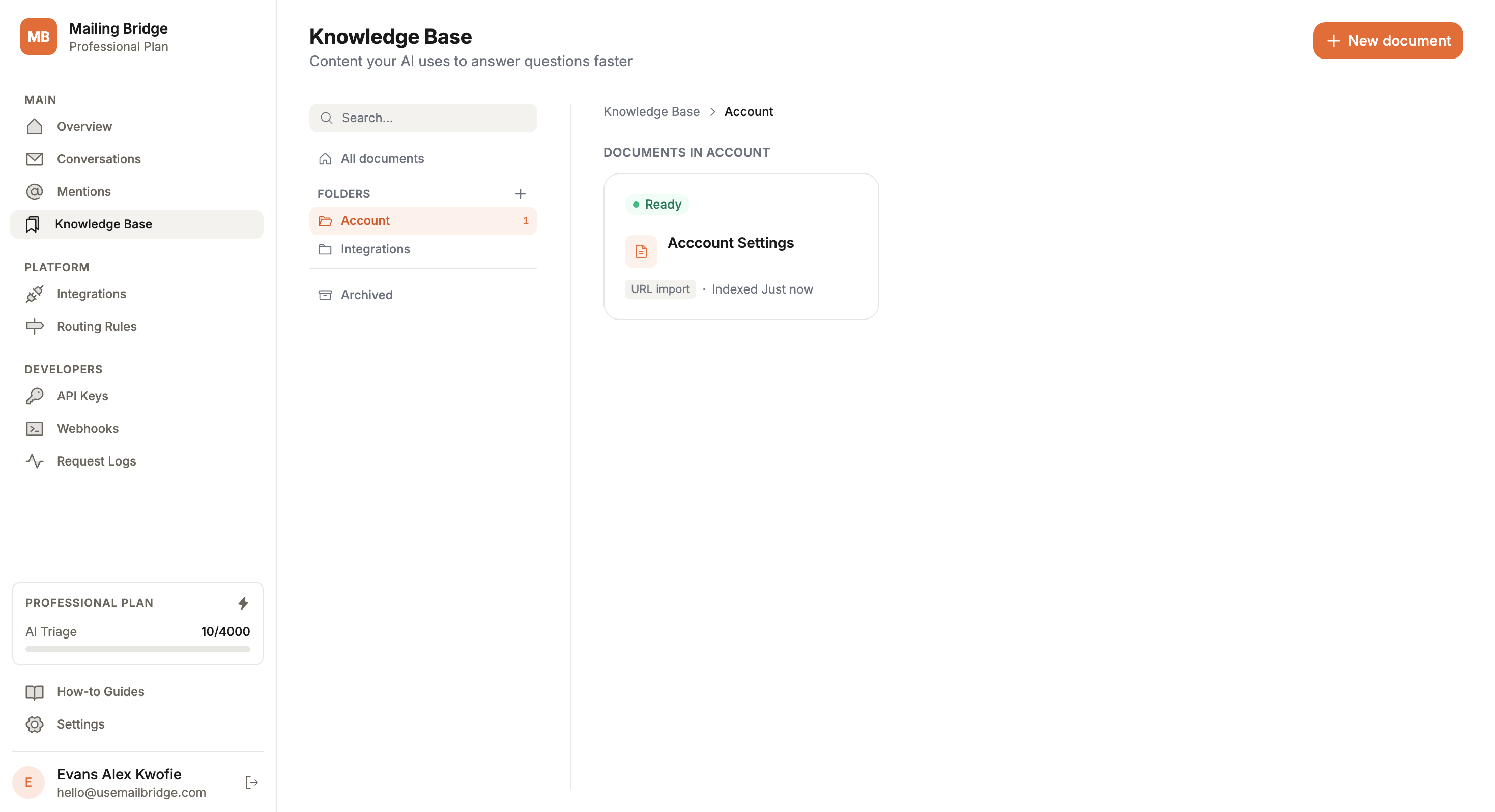
The Knowledge Base is a place to put everything your AI should know before it touches an incoming email.
Product documentation. Pricing pages. FAQ content. Internal policy notes. Support runbooks. Anything that a new support agent would need to read on their first day — your AI now reads it before every triage.
When a customer email arrives, the triage pipeline retrieves the most relevant sections from your knowledge base and uses them as context. The AI is no longer reasoning from general training data alone. It has your actual product knowledge in front of it.
The difference shows up immediately in suggested replies. Instead of “I’d be happy to help with your question about billing,” the AI writes something specific: it references the correct plan name, quotes the right refund window, and explains the process your team actually follows.
How it works under the hood
Documents you add to the Knowledge Base are broken into sections and chunks. Each chunk is embedded using a vector model — converted into a numerical representation of its meaning — and stored alongside the original text.
When an email arrives, the same embedding process runs on the email content. The pipeline finds the chunks in your knowledge base that are semantically closest to what the customer is asking about and injects them into the triage context.
This is retrieval-augmented generation. The AI does not need to have memorised your policies. It retrieves the relevant text at the moment it needs it and uses it in context.
The practical effect is that adding a document to your Knowledge Base immediately improves triage quality for every related email that comes in after — without any retraining, without any configuration, without touching your AI settings.
Organising your knowledge
Documents live in folders. You can structure them however makes sense for your team — by product area, by topic, by customer segment, by whatever taxonomy your support team already uses.
Each document has a status. When you first add a document, it enters a processing state while the embedding pipeline runs. Once indexed, it becomes active and starts contributing to triage. If you update a document, it goes back through the pipeline automatically. If you archive a document, it stops being used without being deleted.
This makes it straightforward to keep your knowledge base current. When your pricing changes, update the pricing document. When a bug gets fixed and a workaround is no longer needed, archive that entry. The AI reflects the current state of your knowledge, not a snapshot from whenever you last had time to update things.
What to put in your Knowledge Base
The most valuable content to start with is the material that comes up most often in support conversations.
Pricing and plan details are the most common source of generic AI replies. If your AI does not know the difference between your Starter and Growth plans, it cannot give a useful answer to a billing question. Add your pricing page first.
Refund and cancellation policies come next. These are the questions where agents most often have to pause and double-check. When the AI has the policy in front of it, the suggested reply gets it right the first time.
Product-specific troubleshooting is where the compounding value starts to show. The more documentation you add, the more narrowly relevant the AI’s responses become. A customer asking about a specific integration gets a response that references that integration by name, not a generic troubleshooting template.
Over time, the Knowledge Base becomes the place where your team’s accumulated support knowledge lives. New agents read it to get up to speed. The AI uses it to respond accurately. Both improve together as the document library grows.
Why this matters for small teams
Generic AI triage tools are designed for teams that want to deflect volume. The goal is to answer as many tickets as possible without a human.
That is not what most of the teams using MailBridge are trying to do. They want to handle every customer conversation well. They want their AI to make their agents faster and more accurate, not to replace the human judgement that builds customer relationships.
The Knowledge Base makes the AI a better collaborator. It arrives at the Slack notification with the relevant context already loaded. Your agent reads the summary, sees the suggested reply, confirms it is accurate, and sends it. The whole loop takes thirty seconds instead of three minutes.
That is what good AI support tooling actually looks like: not fewer humans, but better-informed ones.
The Knowledge Base is available now on all MailBridge plans. You can start adding documents from the Knowledge Base section in your dashboard.